
在企业信息管理中,某些敏感的端口需要本地访问,但是呢又不想使用VPN网关。
VPN网关是您在阿里云专有网络创建的网关设备。 VPN网关是一款基于Internet、通过加密通道将企业数据中心、企业办公网络、Internet终端和阿里云专有网络连接起来的网络服务 ,一个VPN网关可以同时支持多个站点到站点的IPsec VPN连接和点到站点的SSL VPN连接。还有一个方式在安全组上设置IP放行。
菜单
一、基本操作(纯手工)
1.1 获取当前的IP
shell>>>curl ipinfo.io/ip
113.XXX.XXX.XXX
1.2、安全组设置放行IP
| 格式 | 含义 | 适用场景 |
| 113.192.192.192/32 | 仅允许该单个 IP 访问 | 精准放行某一台设备 |
| 113.192.192.0/24 | 允许该网段所有 IP 访问 | 放行同一网段的多台设备 |
| 0.0.0.0/0 | 允许所有公网 IP 访问 | 临时测试(不建议长期使用) |

例如这样阿里云设置规则,放行1433端口,保存成功后telnet
shell>>telnet xxx.xxx.xxx.xxx 1433
Trying xxx.xxx.xxx.xxx...
Connected to xxx.xxx.xxx.xxx.
Escape character is '^]'.
----表示端口通畅
二、自动化方法
上述方式比较笨拙,因为每次都需要查询,IP也会动态变化呢?如何实现自动化呢?
- 阿里云创建RAM账号
- 赋予最小安全组权限
- 编写shell脚本
- 设置环境变量并验证脚本
- 设置定时运行
2.1 创建RAM账号
略
2.2 创建最小安全组权限
创建自定义权限策略

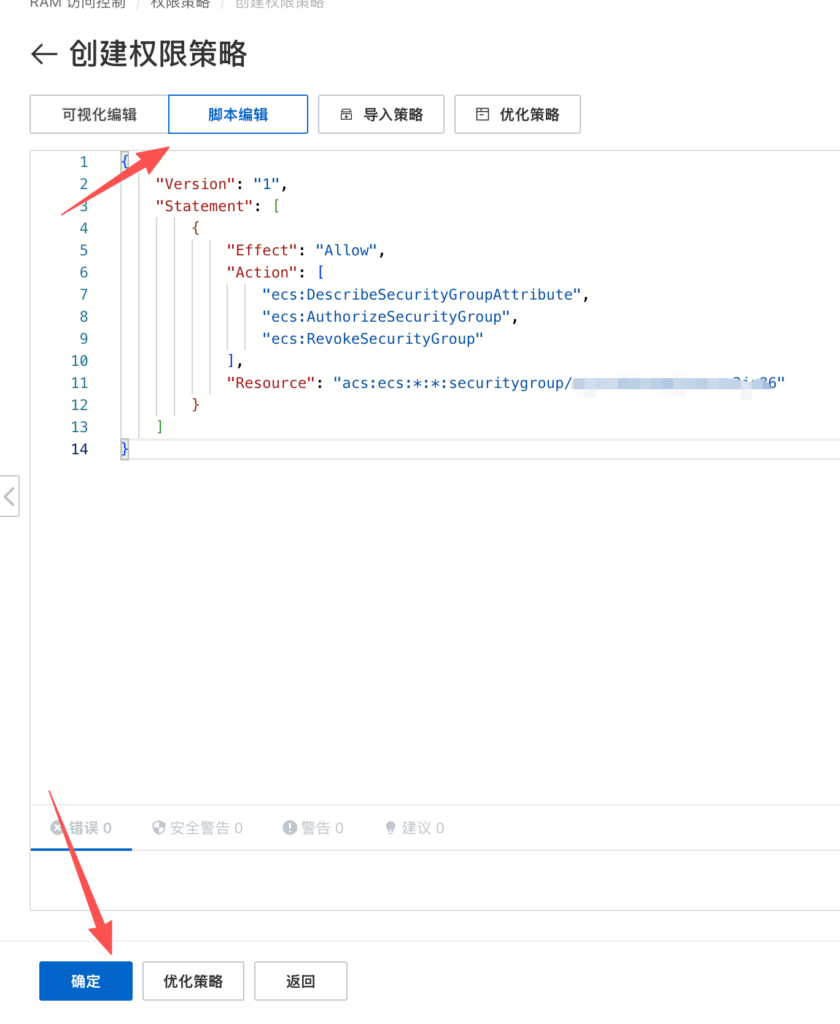
{
    "Version": "1",
    "Statement": [
        {
            "Effect": "Allow",
            "Action": [
                "ecs:DescribeSecurityGroupAttribute",
                "ecs:AuthorizeSecurityGroup",
                "ecs:RevokeSecurityGroup"
            ],
            "Resource": "acs:ecs:*:*:securitygroup/sg-XXX安全组的IDXX"
        }
    ]
}
用户添加该权限,略
2.3、安装依赖工具 (jq 和 aliyun-cli)
CentOS 默认可能没有 jq 和阿里云命令行工具,请执行以下命令进行安装:
# 1. 安装基础工具和 jq (处理 JSON 必备)
sudo yum install -y epel-release
sudo yum install -y curl jq

# 2. 安装阿里云 CLI (aliyun)
# 下载最新版 (以 Linux 64位 为例)
wget https://github.com/aliyun/aliyun-cli/releases/download/v3.0.250/aliyun-cli-linux-3.0.250-amd64.tgz

# 解压并移动到系统路径
tar xzwf aliyun-cli-linux-3.0.250-amd64.tgz
sudo mv aliyun /usr/local/bin/

# 验证安装
aliyun version
确认环境变量名称
阿里云 CLI 工具 默认识别 的环境变量名称是固定的。请确保您设置的环境变量名称如下(如果不一致,脚本会报错提示需要 configure):
- ALIBABA_CLOUD_ACCESS_KEY_ID
- ALIBABA_CLOUD_ACCESS_KEY_SECRET
- ALIBABA_CLOUD_REGION_ID (建议设置,例如 cn-shenzhen )
echo 'export ALIBABA_CLOUD_ACCESS_KEY_ID="您的ID"' > /data/app/aliyun/.aliyun_env
echo 'export ALIBABA_CLOUD_ACCESS_KEY_SECRET="您的Key"' >> /data/app/aliyun/.aliyun_env
echo 'export ALIBABA_CLOUD_REGION_ID="cn-shenzhen"' >> /data/app/aliyun/.aliyun_env
chmod 600 /data/app/aliyun/.aliyun_env
2.4 创建shell脚本
shell>>vim update_sg_ip.sh#!/bin/bash
[ -f /data/app/aliyun/.aliyun_env ] && source /data/app/aliyun/.aliyun_env
# Configuration
SG_ID="sg-wz93subpqlwwnts3ju86"
REGION_ID="cn-shenzhen"
PORT="1433"
DESCRIPTION="XinyeLocalIP"
# Function to check dependencies
check_deps() {
for cmd in curl aliyun jq; do
if ! command -v $cmd &> /dev/null; then
echo "Error: $cmd is not installed."
exit 1
fi
done
}
# 1. Get Current Public IPs
get_current_ips() {
echo ">>> Step 1: Fetching Local Public IPs"
IP_FILE=$(mktemp)
# Source 1: ipinfo.io
# Use xargs to trim whitespace/newlines
IP1=$(curl -s ipinfo.io/ip | xargs)
echo " [Source 1] ipinfo.io : $IP1"
if [[ -n "$IP1" ]]; then echo "$IP1" >> "$IP_FILE"; fi
# Source 2: icanhazip.com
IP2=$(curl -s icanhazip.com | xargs)
echo " [Source 2] icanhazip.com : $IP2"
if [[ -n "$IP2" ]]; then echo "$IP2" >> "$IP_FILE"; fi
if [ ! -s "$IP_FILE" ]; then
echo "Error: Could not fetch IP from any source."
rm "$IP_FILE"
exit 1
fi
# Create Array of Unique IPs (deduplicate)
CURRENT_IPS=($(sort -u "$IP_FILE"))
rm "$IP_FILE"
echo " => Target IPs Array: ${CURRENT_IPS[@]}"
echo ""
}
# 2. Update Security Group
update_sg() {
echo ">>> Step 2: Syncing with Aliyun Security Group ($SG_ID)"
# Get current rules from Aliyun
# Fetch full JSON first
RULES_JSON=$(aliyun ecs DescribeSecurityGroupAttribute --RegionId "$REGION_ID" --SecurityGroupId "$SG_ID" --Direction ingress --NicType internet)
# Extract IPs that match our Description and Port
EXISTING_IPS_STR=$(echo "$RULES_JSON" | jq -r --arg desc "$DESCRIPTION" --arg port "$PORT/$PORT" \
'.Permissions.Permission[] | select(.Description == $desc and .PortRange == $port and .IpProtocol == "TCP") | .SourceCidrIp')
# Convert string to Array
EXISTING_IPS_ARRAY=($EXISTING_IPS_STR)
echo " Current Aliyun Allowed IPs: ${EXISTING_IPS_ARRAY[@]}"
if [ ${#EXISTING_IPS_ARRAY[@]} -eq 0 ]; then
echo " (No existing rules found for $DESCRIPTION)"
fi
echo ""
# --- ACTION 1: ADD MISSING IPs ---
# Logic: Loop through CURRENT_IPS, if not in EXISTING_IPS_ARRAY, then ADD.
for ip in "${CURRENT_IPS[@]}"; do
found=false
for exist_ip in "${EXISTING_IPS_ARRAY[@]}"; do
if [[ "$ip" == "$exist_ip" ]]; then
found=true
break
fi
done
if [[ "$found" == "false" ]]; then
echo " [ACTION] Adding Rule: $ip"
aliyun ecs AuthorizeSecurityGroup \
--RegionId "$REGION_ID" \
--SecurityGroupId "$SG_ID" \
--IpProtocol tcp \
--PortRange "$PORT/$PORT" \
--SourceCidrIp "$ip" \
--Description "$DESCRIPTION" \
--Policy Accept
else
echo " [SKIP] IP $ip already authorized."
fi
done
# --- ACTION 2: REMOVE OBSOLETE IPs ---
# Logic: Loop through EXISTING_IPS_ARRAY, if not in CURRENT_IPS, then REMOVE.
for exist_ip in "${EXISTING_IPS_ARRAY[@]}"; do
keep=false
for ip in "${CURRENT_IPS[@]}"; do
if [[ "$exist_ip" == "$ip" ]]; then
keep=true
break
fi
done
if [[ "$keep" == "false" ]]; then
echo " [ACTION] Removing Rule: $exist_ip"
aliyun ecs RevokeSecurityGroup \
--RegionId "$REGION_ID" \
--SecurityGroupId "$SG_ID" \
--IpProtocol tcp \
--PortRange "$PORT/$PORT" \
--SourceCidrIp "$exist_ip" \
--Policy Accept
fi
done
echo ">>> Sync Complete."
}
# Main Execution
check_deps
get_current_ips
update_sgshell>>chmod +x update_sg_ip.sh2.5设备定时
# 每天 06:00 - 20:00,每6小时执行一次
0 6-20/6 * * * /data/app/aliyun/update_sg_ip.sh >> /data/app/aliyun/update_sg_ip.log 2>&1
三、centos实现端口转发
3.1安装
#安装依赖
yum install gcc gcc-c++ make git -y
#克隆源码
git clone https://github.com/boutell/rinetd.git
#进入rinetd源码目录
cd rinetd
#创建手册目录
mkdir -p /usr/man/man8
#编译安装
make && make install
查看版本
[root@localhost rinetd]# /usr/sbin/rinetd -v导出手册
man rinetd > rinetd.txt3.2注册服务
#创建rinetd相关文件夹
mkdir /usr/local/rinetd /usr/local/rinetd/sbin /usr/local/rinetd/etc/ /usr/local/rinetd/log
#移动可执行文件
mv  /usr/sbin/rinetd  /usr/local/rinetd/sbin
#编辑配置文件
vim /usr/local/rinetd/etc/rinetd.conf
编写服务文件
vim  /lib/systemd/system/rinetd.service

[Unit]
Description=Rinetd Daemon
After=network.service
Wants=network.service
[Service]
Type=forking
#PIDFile=/var/run/rinetd.pid
ExecStart=/usr/local/rinetd/sbin/rinetd -c /usr/local/rinetd/etc/rinetd.conf
Restart=on-failure
[Install]
WantedBy=multi-user.target

#重新加载
systemctl  daemon-reload
#开机自启rinetd
systemctl enable rinetd.service
配置文件
#配置文件内容
#vim /usr/local/rinetd/etc/rinetd.conf
#
0.0.0.0 3306 192.168.0.110 3306
#0.0.0.0 3306 3a9f2f27648e4c85a9c5d2e7fba12ae0in01.internal.cn-north-4.mysql.rds.myhuaweicloud.com 3306
0.0.0.0 6379 redis-47c5c0d-dcs-ps4e.dcs.huaweicloud.com 6379
logfile /usr/local/rinetd/log/rinetd.log
常见的服务命令
systemctl enable rinetd.service    //开机自启rinetd

systemctl disable rinetd.service    //禁用开机自启rinetd

systemctl start rinetd.service    //启动rinetd

systemctl stop rinetd.service    //关闭rinetd

systemctl restart rinetd.service   //重启rinetd

systemctl status rinetd.service   //查看状态rinetd